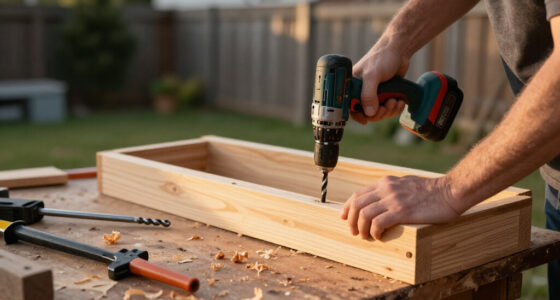

This guide helps beginners choose a cordless power drill set, check that its parts fit the intended work, and use the drill for basic screwdriving or drilling. You will finish with a ready-to-use tool, a charged battery, and a safe method for completing a simple task. Allow 30-60 minutes to compare a set and prepare it; actual project time depends on the material and number of fasteners.

Get business pricing on tools and workshop supplies
- Business-only prices and quantity discounts
- Tax-exempt purchasing
- Multiple users, one account, clear invoices

BLACK+DECKER 20V MAX Cordless Brushless 1/2-in. Drill Driver with 30-Piece Bit Set and 2Ah Battery
- ✔ Power: 20V MAX battery powered
- ✔ Motor: Brushless
- ✔ Maximum torque: 486 in-lb.
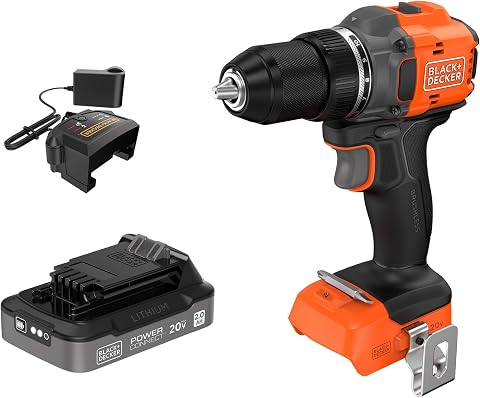
BLACK+DECKER 20V MAX POWERCONNECT Brushless Cordless Drill/Driver with 2Ah Battery and Charger
- ✔ Model: BLD782D1
- ✔ Power: 20V MAX (18V nominal)
- ✔ Motor: Brushless
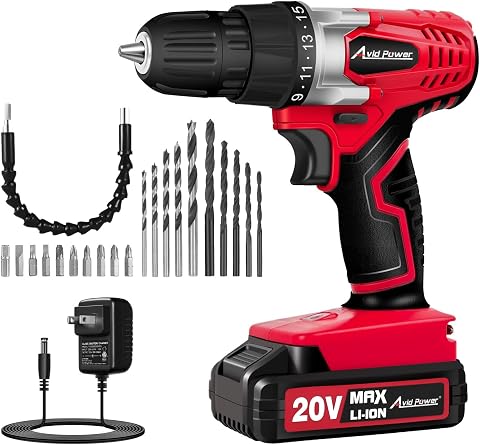
AVID POWER 20V Cordless Drill Set with Battery, Charger, and 22 Bits
- ✔ Voltage: 20V
- ✔ Maximum torque: 280 in-lb.
- ✔ Maximum speed: 550 RPM
Difficulty: Beginner | Time: 30-60 minutes for selection and first setup; project time varies
What You’ll Need
Tools & Materials:
- Cordless drill/driver set with battery, charger, and included accessories
- Safety glasses
- Compatible drill bits or screwdriver bits for the job
- Tape measure, pencil, and a suitable work surface or clamps
- The manufacturer’s manual
Knowledge:
- Basic ability to identify the work material and choose a matching bit
- Ability to follow tool and battery safety instructions
Before purchasing, check the set’s voltage, battery capacity, chuck range, included bits, and warranty. Confirm that replacement batteries are available and compatible with that exact tool platform. For concrete, heavy structural work, or repeated large-hole drilling, a standard drill/driver set may not be the right tool; check the tool maker’s recommendations or ask a qualified supplier.
BLACK+DECKER 20V MAX Cordless Brushless 1/2-in. Drill Driver with 30-Piece Bit Set and 2Ah Battery
This is the most balanced choice when we want a drill set that can handle more than occasional screwdriving without needing to assemble a separate bit collection. Its brushless motor, ½-inch chuck, and listed 486 in-lb. torque give it the strongest stated capability tier in this group, matching the POWERCONNECT drill rather than the lighter AVID POWER. Two speed settings and variable speed help us adapt between driving fasteners and drilling, while the LED is useful when working inside cabinets or in dim corners.The deciding advantage over the otherwise similar POWERCONNECT model is the 30-piece bit set. That makes this package more immediately useful for a household that is starting from scratch. The tradeoff is that the supplied battery is still only 2Ah, so the extra capability does not mean uninterrupted heavy work. Compared with AVID POWER, this drill is a better fit for broader DIY tasks, but it is also a less compelling choice if low weight and simple, occasional use matter more than torque and chuck capacity.
Pros:
- Brushless motor with up to 486 in-lb. of listed torque
- Includes a 30-piece bit set, 2Ah battery, and charger
- ½-inch chuck accommodates a broader range of bits than AVID POWER’s ⅜-inch chuck
- Two speeds, variable speed control, and LED work light support varied DIY tasks
Cons:
- The included 2Ah battery may need recharging during heavier or extended use
- The larger accessory package may be unnecessary for buyers who already own bits
- The supplied details do not establish it as a masonry or hammer drill
Best for: DIYers who want a capable brushless drill, charger, battery, and a substantial bit assortment in one starter package.
Not ideal for: People planning long, demanding work sessions who need extended runtime, or buyers who need a drill specifically suited to concrete or masonry.
Bottom line: We rank this first because it combines the group’s stronger listed drill capability with the most useful ready-to-start bit assortment.
“We rank this first because it combines the group’s stronger listed drill capability with the most useful ready-to-start bit assortment.”
BLACK+DECKER 20V MAX POWERCONNECT Brushless Cordless Drill/Driver with 2Ah Battery and Charger
At the drill level, this POWERCONNECT model is closely matched to our overall pick: it is brushless, reaches a listed 486 in-lb. of torque, and has a ½-inch keyless chuck with two speed ranges. Its 10 clutch positions plus drilling mode give us useful control when switching between fastening jobs and drilling, while the metal chuck and belt clip add practical details. The key distinction is not raw stated performance but what comes in the box and where the battery fits.Unlike the 30-piece BLACK+DECKER set, this package includes only a double-ended screwdriver bit. That makes it less attractive as a first drill purchase, but more sensible if we already have bits and want a tool compatible with BLACK+DECKER 20V MAX POWERCONNECT equipment. Compared with AVID POWER, it offers a larger chuck and substantially higher listed torque, though the AVID kit includes far more accessories and weighs less. Its 2Ah battery remains the same runtime consideration as the overall pick.
Pros:
- Brushless motor with up to 486 in-lb. of listed torque
- ½-inch keyless metal chuck and two speed ranges
- 10 clutch positions plus a drilling setting for fastening control
- Battery is compatible with BLACK+DECKER 20V MAX POWERCONNECT tools
Cons:
- Includes only a double-ended screwdriver bit, far fewer accessories than the 30-piece set
- The included battery is 2Ah, so runtime depends heavily on task and conditions
- At 4 pounds as listed, it is heavier than the 2.5-pound AVID POWER option
Best for: Owners of BLACK+DECKER 20V MAX POWERCONNECT tools who want a brushless drill and already have a useful bit collection.
Not ideal for: First-time buyers who need a broad bit assortment in the box, or anyone expecting a 2Ah battery to support long, high-demand sessions.
Bottom line: Choose it over the 30-piece set when POWERCONNECT compatibility matters more than receiving a ready-made assortment of bits.
“Choose it over the 30-piece set when POWERCONNECT compatibility matters more than receiving a ready-made assortment of bits.”
AVID POWER 20V Cordless Drill Set with Battery, Charger, and 22 Bits
AVID POWER takes a different approach from the BLACK+DECKER drills: it prioritizes a light 2.5-pound body, a charge-level display, and a useful selection of common accessories over high stated torque or speed. Its 15+1 torque settings help us choose a gentler fastening setting for furniture assembly, while the built-in LED and rubberized grip make everyday repairs more manageable. The kit’s 22 accessories include drill and driver bits, a flexible shaft, and an extension bar, so a new owner can cover a range of basic tasks without buying extras immediately.Those advantages have limits. Its 280 in-lb. maximum torque, 550 RPM ceiling, and ⅜-inch chuck place it below both BLACK+DECKER options for broader or more demanding drilling. It is also explicitly not intended for concrete or masonry, and its battery works only with AVID POWER tools. Compared with the BLACK+DECKER 30-piece set, it is lighter and has a charge display, but gives up brushless performance and a larger chuck. We would choose it for occasional home use, not as the most expandable set in this lineup.
Pros:
- Lightweight 2.5-pound design with rubberized grip
- 15+1 torque settings support controlled screwdriving
- Battery charge display helps us monitor remaining charge
- 22 accessories, battery, and charger provide a useful basic kit
Cons:
- Lower listed torque and speed than either BLACK+DECKER brushless drill
- Not suitable for concrete or masonry
- Battery is compatible only with AVID POWER tools
Best for: Beginners and occasional DIYers focused on furniture assembly, basic household repairs, and light drilling in wood or metal.
Not ideal for: Buyers drilling concrete or masonry, seeking higher-capacity drilling, or wanting batteries compatible with a broader tool system.
Bottom line: We recommend it for light household tasks where low weight and built-in accessories matter more than higher drilling capability or battery-platform flexibility.
“We recommend it for light household tasks where low weight and built-in accessories matter more than higher drilling capability or battery-platform flexibility.”
As an Amazon Associate we earn from qualifying purchases.
Before You Start
Read the manual for the drill, battery, and charger. Wear safety glasses, tie back long hair, and keep loose clothing away from the chuck. Remove jewelry that could catch. Secure the work so it cannot spin or slide, and check both sides of the drilling area for wires, pipes, or other hidden hazards. Do not use a damaged battery, charger, bit, or drill. Disconnect the battery before changing a bit or making adjustments.
Step-by-Step Instructions
Step 1: Match the set to your projects
List the jobs you expect to do, such as assembling furniture, driving screws into wood, or drilling small holes in wood or metal. Choose a drill/driver set rated for those materials and tasks. For general home use, compare the chuck capacity, speed settings, clutch positions, battery capacity, weight, and included accessories. A larger battery can run longer but may make the tool heavier. Check the listed chuck capacity against the largest bit you intend to use, and verify that the set includes, or can accept, the bits your jobs require.
Tip:Do not choose by voltage alone. Battery capacity, tool design, bit compatibility, and the work you plan to do also affect usability.
Check: You can name the material and approximate hole or screw sizes the set needs to handle, and the product specifications cover them.
Step 2: Inspect the kit and read its instructions
Unpack the set and compare its contents with the parts list in the manual. Check the drill body, battery, charger, chuck, and bits for cracks, bends, or other damage. Find the controls for forward and reverse, trigger speed, gear selection, clutch adjustment, and any drilling mode. Read the battery charging instructions before connecting it to power.
Tip:Keep the manual and model number. Battery systems and charger procedures can differ even between products from the same brand.
Check: All listed parts are present and undamaged, and you can identify the controls without guessing.
Step 3: Charge and install the battery
Place the charger on a dry, stable surface with room for ventilation. Charge the battery using the supplied charger and the procedure in the manual. Watch its indicator and wait for the stated full-charge signal. Remove the battery from the charger if the instructions call for it, then slide it into the drill until its latch clicks into place. Do not force a battery that does not fit.
Tip:Stop charging if the battery or charger becomes unusually hot, smells unusual, or shows visible damage. Follow the manufacturer’s advice rather than continuing to use it.
Check: The charger indicates a full charge, and the battery sits firmly in the drill without moving or releasing.
Step 4: Choose a bit and secure the work
Select a bit made for the material and task: use a screwdriver bit that matches the screw head, or a drill bit sized for the planned hole. Remove the battery before fitting the bit. Open the chuck, insert the bit straight and far enough to grip securely, then tighten the chuck according to the manual. Pull the bit gently to check that it is held firmly. Mark the work location and clamp the material if it could shift. Confirm that the bit will not strike a nearby surface or hidden service.
Tip:A mismatched screwdriver bit can slip and damage the screw head. A dull, bent, or inappropriate drill bit can wander, overheat, or bind.
Check: The bit is straight in the chuck, does not pull free by hand, and the workpiece is stable.
Step 5: Set direction, gear, and clutch
Set the direction selector to forward for driving most screws and drilling. Select reverse only to back out a screw or free a bit, and release the trigger before changing direction. Choose a lower gear for slower, stronger screwdriving and a higher gear for faster drilling when the manual recommends it. For screws, begin with a low clutch setting; for drilling, use the drill setting if your model has one. Keep the tool off while making these adjustments.
Tip:Clutch numbers are not universal. Test a low setting on scrap material and increase it only if the screw stops before reaching the intended depth.
Check: The direction matches the job, the selected gear is appropriate, and the clutch is not set higher than needed.
Step 6: Make a controlled test
Put on safety glasses and hold the drill with a secure grip. Position the bit square to a piece of scrap material of the same type, if available. Keep the bit clear of the surface, press the trigger gently, and let the tool reach a controlled speed before touching the work. Drive a test screw or make a short test hole while keeping the drill straight. Release the trigger before lifting the tool away.
Tip:Do not push hard to compensate for a dull bit or a slipping fastener. Stop and correct the setup instead.
Check: The bit stays engaged, the drill runs without unusual vibration, and the test screw or hole is controlled and undamaged.
Step 7: Complete the task and put the kit away
Repeat the same controlled technique on the marked work area. Keep the drill aligned with the screw or hole, use steady trigger pressure, and pause if the bit binds, the tool strains, or the battery indicator signals low charge. Release the trigger when each fastener reaches the intended depth. When finished, release the trigger, remove the battery before changing bits or cleaning, and allow hot bits to cool before handling. Wipe dust from the tool and store the drill, battery, charger, and accessories as directed by the manual.
Tip:Do not touch a bit immediately after prolonged drilling; friction can make it hot enough to burn skin.
Check: The fasteners are seated as intended or the holes are in the marked locations, the workpiece is intact, and the tool and accessories are stored safely.
Common Mistakes to Avoid
- Changing bits while the battery is installed. — Remove the battery before adjusting the chuck or handling the bit. This prevents accidental trigger activation.
Troubleshooting
Problem: The drill will not run.
Solution: Release the trigger, check that the battery is charged and latched fully into place, and verify that the direction selector is not in its center lock position. Consult the manual if the indicator shows a fault or the tool still will not operate.
Problem: The screw bit slips out of the screw head.
Solution: Stop the drill. Use the correct bit type and size, seat it squarely in the screw head, and reduce trigger pressure. Replace a worn bit or damaged screw rather than forcing it.
Problem: The drill bit wanders or the hole is off-center.
Solution: Stop and re-mark the location. Secure the workpiece, begin with the drill square to the surface, and use a center punch on suitable metal if the bit maker or project instructions recommend it.
Problem: The drill slows, stalls, or the bit binds.
Solution: Release the trigger and switch to reverse only when the tool has stopped, following the manual’s instructions for freeing a bit. Check for an unsuitable or dull bit, excessive pressure, an incorrect gear, or a hole size beyond the tool’s rating. Let the tool cool if it is hot.
What Success Looks Like
The chosen set matches the intended materials and fastener or hole sizes, its battery and accessories are in good condition, and you can operate its controls correctly. During use, the workpiece remains secure, the bit stays engaged and aligned, and the finished screws or holes match the planned locations and depth without damage. The drill shows no unusual heat, vibration, or operating fault, and the kit is stored according to its manual.
Next Steps
After the first job, clean dust from the drill and bits, inspect accessories for wear, and charge or store the battery as its manual directs. Replace worn or damaged bits rather than continuing with them. Keep a short list of the bit types and sizes your projects use so you can add compatible accessories. If a task requires a tool or technique outside the drill’s stated rating, stop and check the tool maker’s instructions or get qualified help.
Frequently Asked Questions
What is the difference between a drill/driver and an impact driver?
A drill/driver rotates a chuck and is suited to general drilling and controlled screwdriving. An impact driver delivers rotational impacts and is mainly intended for driving screws and fasteners. It generally uses a different bit holder, so check compatibility before buying accessories. For one general-purpose tool, a drill/driver is often the more flexible starting point.
Can I use a cordless drill to drill into concrete?
Do not assume a standard drill/driver is suitable for concrete. Check the manual for approved materials and whether the model has a hammer function. Masonry work can call for a hammer drill, rotary hammer, and masonry bit. Use the right tool and protective equipment for the job.
How long should I charge a drill battery?
Charging time varies by battery capacity, charger, and battery condition. Use the supplied charger and rely on its indicator or the manufacturer’s stated charging procedure instead of a fixed time estimate.
How do I choose the clutch setting for screws?
Start low and test on scrap of the same material. Increase the setting in small steps if the clutch stops the screw before it reaches the intended depth. Stop when the screw is seated without stripping the head or damaging the material.
Can batteries from the same brand be used with every drill?
No. Compatibility depends on the manufacturer’s battery platform, voltage, connector, and product generation. Check the exact model numbers and compatibility list before buying or fitting a battery; never force a battery into a tool.
Halloween Picks
halloween
As an affiliate, we earn on qualifying purchases.